Set Business Hours
Configure when your Seattle business is open so Deep Sentinel guards know when to actively monitor for threats versus allowing normal business activity.
How Business Hours Affect Monitoring
Business hours tell Deep Sentinel when your property is normally occupied. This affects how guards respond to activity:
During Business Hours
Cameras still record, but events are not sent to guards. Activity is assumed to be normal business operations. You can still review footage in History.
Outside Business Hours
Live guards actively monitor all camera feeds. Any detected person triggers guard review and potential intervention.
Example: If your Seattle retail store is open 9 AM - 6 PM, set those as business hours. Guards will actively protect the property from 6 PM - 9 AM when it should be empty.
Navigate to Business Hours
To set or change your business hours:
- Open the Deep Sentinel app
- Tap Settings (bottom right)
- Tap My Business
- Select your property/location from the dropdown
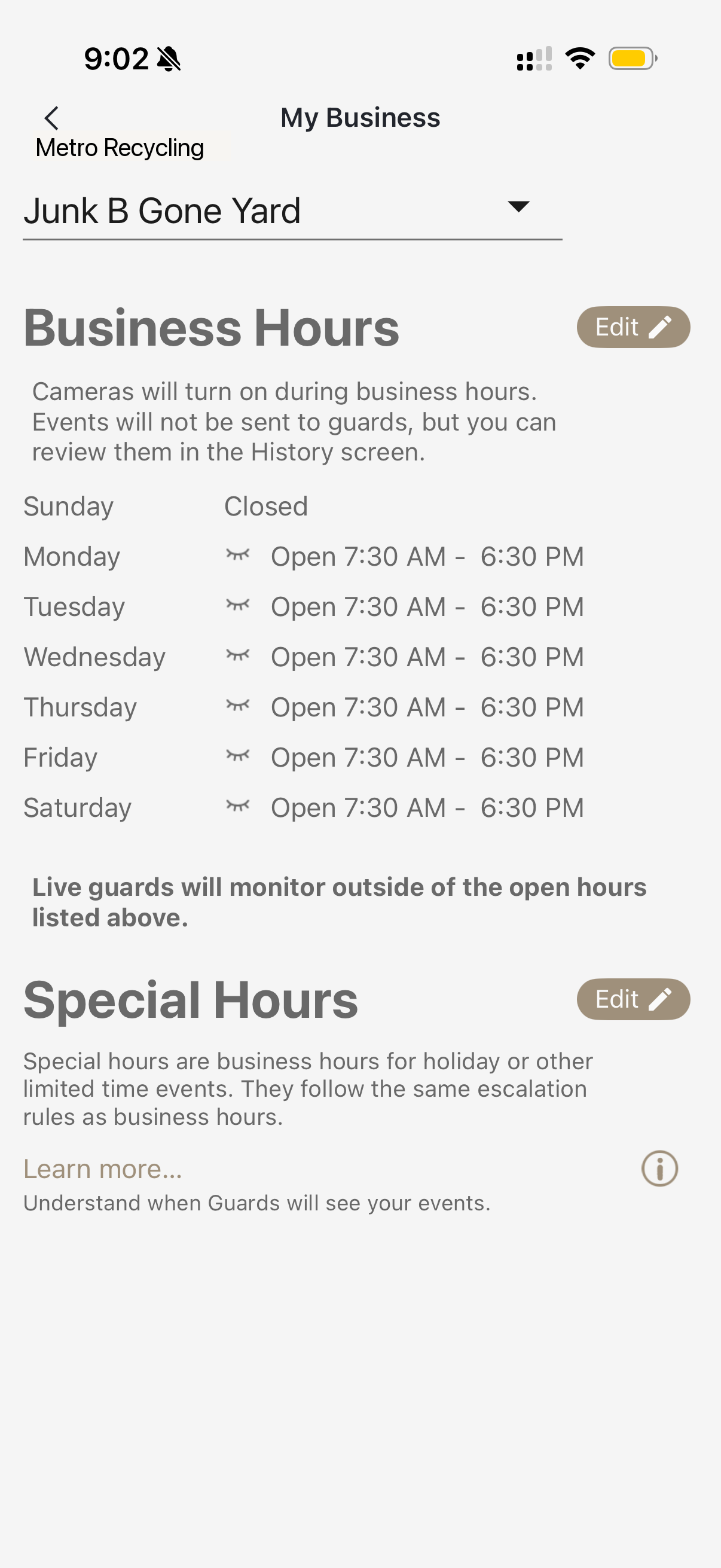
Set Regular Hours
Configure your standard operating hours for each day of the week:
- Tap Edit next to "Business Hours"
- For each day, set the opening time (e.g., 7:30 AM)
- Set the closing time (e.g., 6:30 PM)
- For days you're closed, select "Closed"
- Tap Save when done
Tip: If employees arrive early or stay late, extend your hours slightly to avoid false alerts during those transition times.
Set Special Hours (Holidays)
For holidays or one-time schedule changes, use Special Hours:
- Scroll down to the Special Hours section
- Tap Edit
- Tap Add Special Hours
- Select the date (e.g., December 25)
- Set hours for that day, or mark as Closed
- Tap Save
Special Hours override your regular schedule for specific dates. This is perfect for holidays, maintenance days, or special events at your Seattle location.
Common holidays to add: New Year's Day, MLK Day, Presidents Day, Memorial Day, Independence Day, Labor Day, Thanksgiving, Christmas Eve, Christmas Day.
Multiple Locations
If Pacific Integrated has installed Deep Sentinel at multiple Seattle-area locations, each property can have different business hours:
- Use the dropdown at the top to switch between properties
- Configure hours separately for each location
This is useful if you have a warehouse with different hours than your retail store, or multiple branches across the Seattle metro area.