Use Privacy Mode
Temporarily pause guard monitoring on your Deep Sentinel cameras when you need privacy at your Seattle property. Guards won't see video feeds while Privacy Mode is active.
What Privacy Mode Does
Privacy Mode temporarily stops video feeds from being sent to guards. When enabled:
- Cameras continue recording locally
- Guards do not receive or review any footage
- No guard interventions will occur
- You can still view live feeds in the app
Important: Privacy Mode provides privacy, not security. Your property is unmonitored while active. Use only when needed.
When to Use Privacy Mode
Common scenarios for Privacy Mode at Seattle businesses:
Maintenance Work
Contractors or repair personnel working on your property who might trigger repeated alerts.
Private Events
Company parties, meetings, or events where you'd prefer guards not to observe.
Extended Hours Activity
Working late outside normal business hours when guards would normally be watching.
Deliveries
Large deliveries with multiple trips where you don't need guard oversight.
Enable Privacy Mode
To turn on Privacy Mode:
- Open the Deep Sentinel app
- Tap Privacy Off in the bottom navigation
- Choose a timer duration: 10 minutes, 30 minutes, or 1 hour
- Select which cameras to include (you can toggle individual cameras)
- Tap Set Privacy
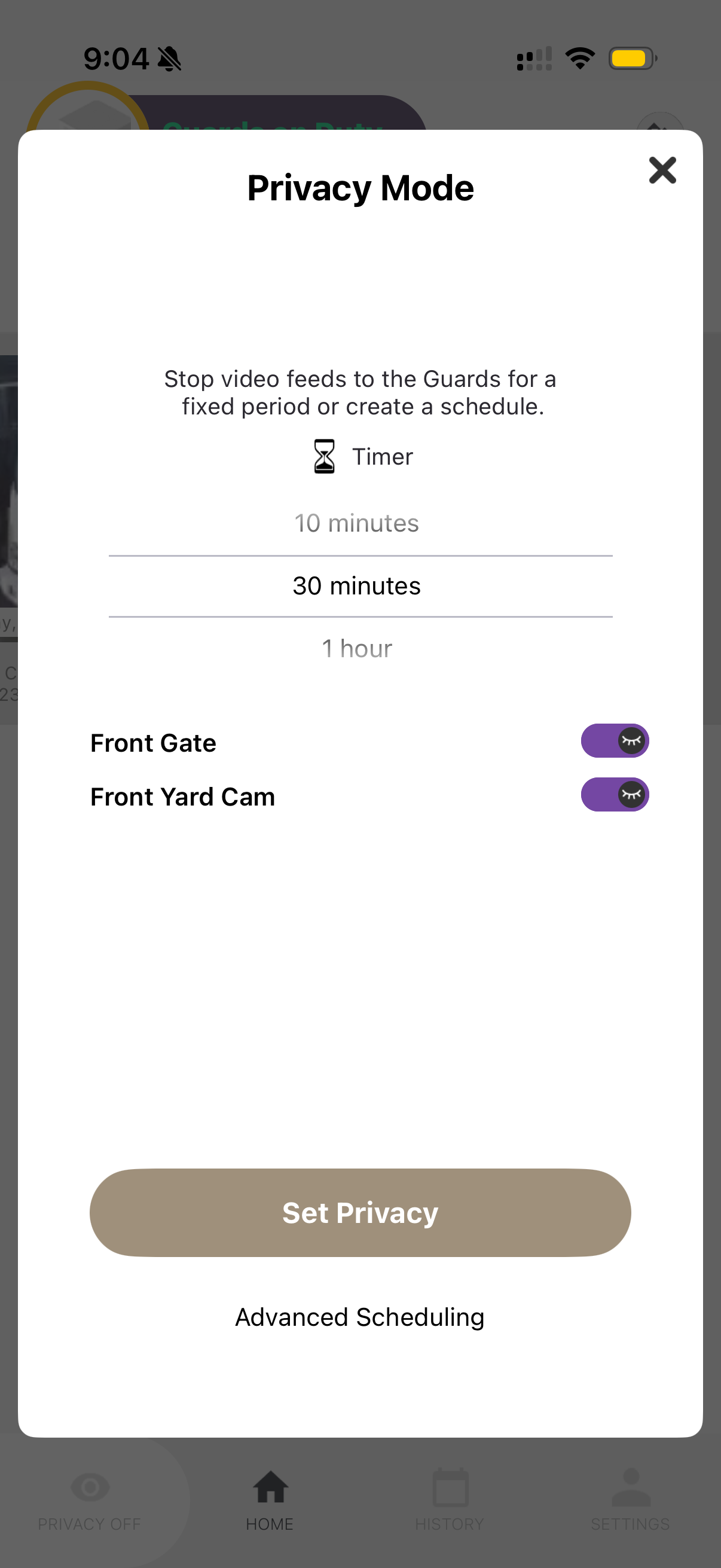
Privacy Mode will automatically turn off after the selected time. The icon will show a countdown while active.
Select Specific Cameras
You don't have to pause all cameras. You can select specific cameras:
- Toggle individual cameras on/off in the Privacy Mode dialog
- Only toggled cameras will have guard monitoring paused
- Other cameras continue normal operation
Example: If contractors are working at your Seattle store's back entrance, enable Privacy Mode only for the "Rear Yard" camera while keeping front cameras monitored.
Advanced Scheduling
For recurring privacy needs, use Advanced Scheduling:
- In the Privacy Mode dialog, tap Advanced Scheduling
- Set specific days and times for automatic Privacy Mode
- Choose which cameras to include
- Save the schedule
This is useful if you have regular recurring events — like a weekly cleaning crew or daily morning meetings — where you'd prefer privacy.
Turn Off Privacy Mode Early
To restore guard monitoring before the timer expires:
- Tap the Privacy icon (showing active countdown)
- Tap Turn Off Privacy Mode
- Guards will immediately resume monitoring
Remember: Always turn off Privacy Mode when your activity is complete to ensure continuous protection of your Seattle property by Deep Sentinel guards.